Home page
The Home page is the default landing page after you sign into Tenovos. The content you can see and the operations you can perform depend on your role privileges and the permissions assigned to the content.
After logging in, you can return to the Home page by clicking the Tenovos logo at the top left of the screen.
NOTE: Tenovos administrative users can remove or replace access to the Tenovos Home page via the branded logo.
Tenovos Home page:
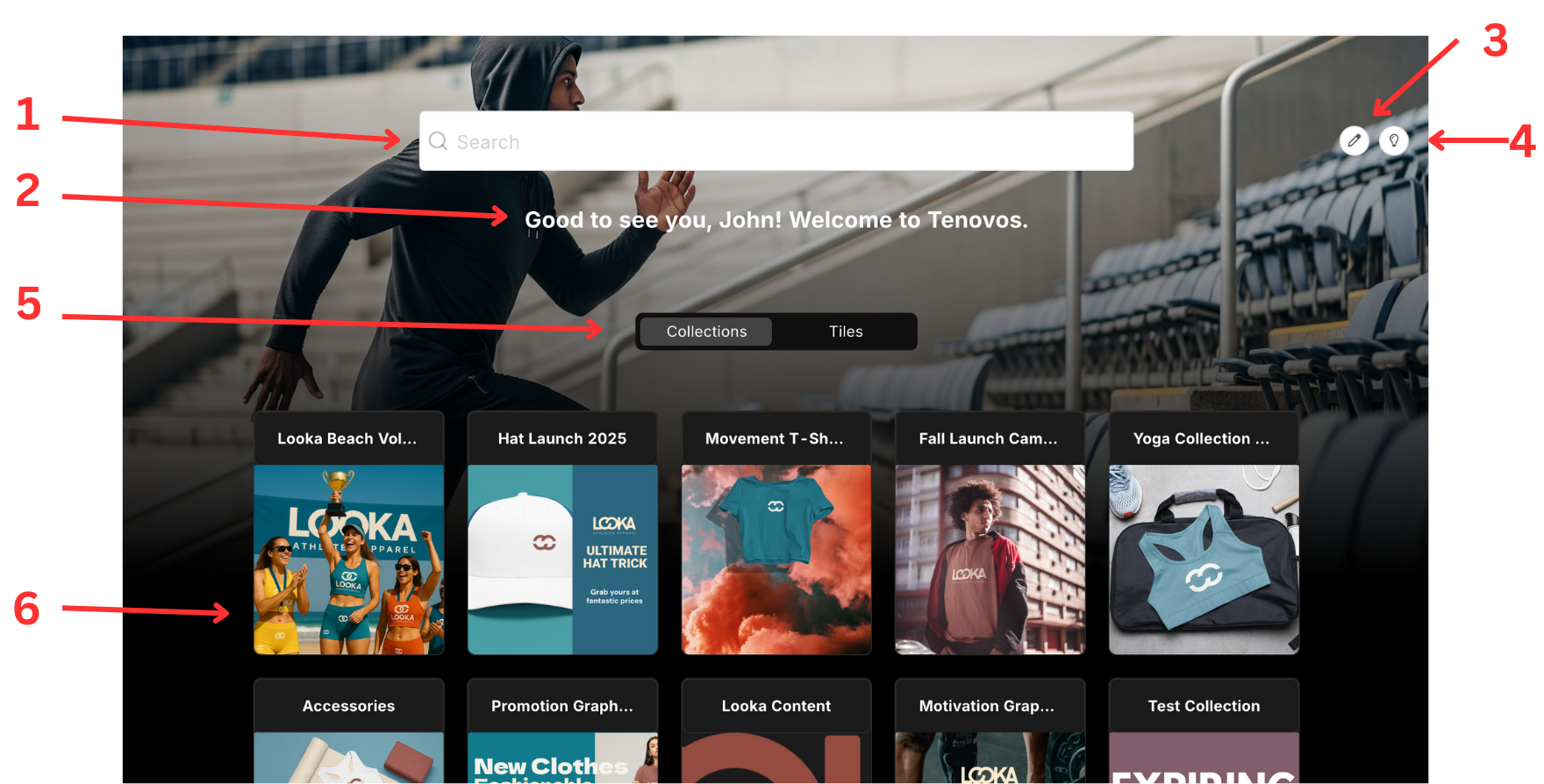
In addition to the navigation bar options described in Tenovos Workspace, the Home page displays the following:
(1) Search field. Enter keywords or metadata to search for assets. Search results are displayed on the Content page. The search field can be hidden via a toggle on the Configurations > Page Layout page.
(2) Configurable Welcome Message. Welcome message that can be customized by user role. This message can be configured on the Configurations > Page Layout page.
(3) Customize Homepage Button. If the user accessing the home page has the 'Configuration Admin' privilege, the button will say 'Customize Homepage' and will navigate the user to the Configurations page.
(4) Dark/Light Mode Toggle. This toggle will be respected on the user level. The default setting can be configured on the Configurations > Page Layout page.
(5) Collection/Tile Toggle Switch. This toggle allows the user to easily switch between viewing Featured Collections and Tiles. The labels for Collections and Tiles can be customized in the Configurations > Branding page. The default content view can be configured on the Configurations > Page Layout page.
(6) Collection and Tile Cards. Area where users can browse strategically Featured Collections and Curated Tiles. Clicking the Collection or Tile card will direct users to the respective Collection/Tile content. The size of the Collection/Tile cards can be configured on the Configurations > Page Layout page.
NOTE: Tenovos administrative users can configure whether or not to display tiles and collections on the Home page. If you do not see them, contact your administrator for details.